Digispark is an ATtiny85 based microcontroller development board come with USB interface. Here we have introduced to open chrome and browse multiple results and download a specific image/picture. And save in your computer. This code is usefull only when you have a programmable DIGISPARK ATTINY85 board.
“Refer the below link TO SETUP A DIGISPARK BOARD :” https://startingelectronics.org/tutorials/arduino/digispark/digispark-windows-setup/
“You can also refer this YOUTUBE VIDEO :” https://youtu.be/wlIHg8nh0iY In this video they have explained each and every thing step by step. Digispark looks as shown below :
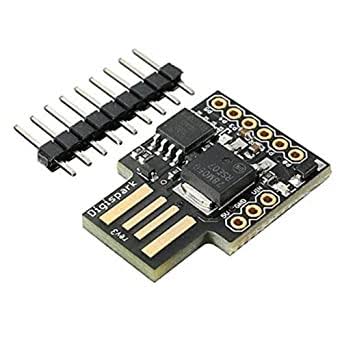
The below code is for opening chrome and downloading a particular image.
#include “DigiKeyboard.h”
void setup() {
// don’t need to set anything up to use DigiKeyboard
}
void loop() {
// this is generally not necessary but with some older systems it seems to
// prevent missing the first character after a delay:
DigiKeyboard.sendKeyStroke(0);
DigiKeyboard.sendKeyStroke(KEY_R, MOD_GUI_LEFT);
DigiKeyboard.delay(500);
// Type out this string letter by letter on the computer (assumes US-style
// keyboard)
DigiKeyboard.print(“chrome”);
DigiKeyboard.delay(500);
DigiKeyboard.sendKeyStroke(KEY_ENTER);
DigiKeyboard.sendKeyStroke(KEY_ENTER);
// It’s better to use DigiKeyboard.delay() over the regular Arduino delay()
// if doing keyboard stuff because it keeps talking to the computer to make
// sure the computer knows the keyboard is alive and connected
DigiKeyboard.delay(5000);
DigiKeyboard.println(“neymar”);
DigiKeyboard.delay(1000);
DigiKeyboard.sendKeyStroke(KEY_ENTER);
DigiKeyboard.delay(5000);
DigiKeyboard.sendKeyStroke(KEY_K, MOD_CONTROL_LEFT);
DigiKeyboard.print(“MESSI”);
DigiKeyboard.delay(1000);
DigiKeyboard.sendKeyStroke(KEY_ENTER);
DigiKeyboard.delay(5000);
DigiKeyboard.sendKeyStroke(KEY_T, MOD_CONTROL_LEFT);
DigiKeyboard.print(“https://phantom-marca.unidadeditorial.es/775876235334c9f43394d226ac349c1d/resize/1320/f/jpg/assets/multimedia/imagenes/2022/01/14/16421717588322.jpg”);
DigiKeyboard.sendKeyStroke(KEY_ENTER);
DigiKeyboard.delay(5000);
DigiKeyboard.sendKeyStroke(KEY_S, MOD_CONTROL_LEFT);
DigiKeyboard.delay(5000);
DigiKeyboard.sendKeyStroke(KEY_ENTER);
for (;;) {
}
}
Tested On :
Windows 10
You can also refer my GitHub for more specific information.


